Domat IDE
Home
  • Basic description of the Domat IDE
  • Start the IDE
  • Process station, or controller (PLC)
  • Project
  • HMI editor
  • Software
  • Domat devices
Contact
  • Čeština
  • English
Home
  • Basic description of the Domat IDE
  • Start the IDE
  • Process station, or controller (PLC)
  • Project
  • HMI editor
  • Software
  • Domat devices
Contact
  • Čeština
  • English
  • Basic description of the Domat IDE
    • Frequently asked questions
    • Programming options
    • Communication options
    • Hardware capabilities
    • User prerequisities
    • Definitions of terms necessary for work in Merbon IDE
    • General proceedings to program PLCs
  • Start the IDE
    • NewSolution
    • New Solution in Simple mode
    • Hot keys
    • Mouse control
    • Settings
    • Searching variables - Quick Find
    • Project archiving
  • Process station, or controller (PLC)
    • PLC attachment (and platform type settings)
    • Controller runtime update
    • Update from HW device
    • Uploading of program to a PLC
    • Online changes
    • Controller properties
    • Controller configuration
    • PLC Reboot
    • Time setup
    • Firewall settings
    • Dynamic Changes
    • Connection over a Proxy server
    • Alarms log
    • Profiles
    • PLC task definition
    • Communication channel settings
    • Definition of HW variables for a communication channel
    • Automatic assignment of a Domat device
    • Export of devices
    • Import of devices
    • Coupling IOs
    • Global variables mapping to hardware I/O
    • Access to variables of another PLC
    • SSL Communication
    • Modbus server setup
    • BACnet server setup
    • SSCP serial server settings
    • OPC server
    • Variable transformation, configuration of analogue inputs
    • History, saving data in a database
    • Alarm overview
    • Debugging
    • Licensing PLC
    • Break points
    • Break points window
    • Exceptions
    • Manual mode
    • Properties of hardware platforms
    • System status
    • PLC resource usage
    • Variables backup
    • Modbus Configurator
    • Comparison of local and remote project
    • Syslog Protocol
    • Bulk write to variables
  • Communication protocols description

    • MQTT protocol driver
    • BACnet protocol driver
    • Daikin iTC (.NET) protocol driver
    • Hauser (.NET) protocol driver
    • IEC 60870-5-104 protocol driver
    • IEC 62056-21 protocol driver
    • K-Bus protocol driver
    • Modbus protocol driver
    • M-bus protocol driver
    • SoftPLC Link protocol driver
    • SSCP protocol driver
    • Text Parser (.NET) protocol driver
    • wModbus protocol driver
  • Project
    • New project
    • Variable definition
    • Autogen - Automatic mapping of variables
    • FUPLA editor
    • ST editor
    • Watch
    • Variable browser
    • Charts
    • Port Monitor
    • Results
    • Output
  • HMI editor
    • Description of HMI editor
    • Binary function
    • Work in Simple mode
    • Work in Full mode
    • User policy
    • HMI text editor objects
    • Definition of LCD menu for PLC
    • Terminal text menu definition
    • HMI graphical objects
    • Terminal graphic menu definition
    • Creating styles
    • Web server
    • Service web
    • Controller as external webserver
    • Domat Visual
  • Software
    • New Solution
    • New Solution in Simple mode
    • Programming languages
    • Access to inputs/outputs of inner block
    • Initial values
    • Common elements

      • Identifiers
      • Keywords
      • White space
      • Comments
      • Literals
      • Variables
      • Constants
    • Data types

      • Elementary data types (BOOL, INT, REAL, STRING, etc.)
      • Generic data types
      • Derived (user) data types
      • Implicit conversions for elementary types
      • Inference rules for overloaded functions selection
    • Object oriented programming (OOP)
      • Pointer data type
      • Reference data type
      • Namespace
    • Program organisation unit (POU)
      • Functions
      • Standard functions
      • Function blocks
      • Standard function blocks
      • Programs
    • ST language (Structured Text)

      • ST editor
      • ST language commands
      • ST language operators
      • ST drivers
    • FUPLA language (FUnction PLAn)

      • FUPLA editor
      • FUPLA wires
      • Visibility of inputs and outputs at a function block
    • Libraries

      • Creating a new library
      • Creating user library
      • Library prototypes
      • Basic Analogue Boxes

        • Composition / Decomposition

          • Bit Composition (BD18)
          • Bit Composition 8bit (BD18)
          • Bit Decomposition (BD19)
          • Bit Decomposition 8bit (BD19)
          • Int Composition (BD55)
          • Int Decomposition (BD54)
        • Controllers

          • Direct Acting (cooling)

            • On-Off Control - Cooling (B30)
            • P-Controller - Cooling (B32)
            • PI-Controller - Cooling (B34)
            • PID-Controller - Cooling (B36)
          • Reverse Acting (heating)

            • On-Off Control - Heating (B31)
            • P-Controller - Heating (B33)
            • PI-Controller - Heating (B35)
            • PID-Controller - Heating (B37)
          • Helpers

            • Helper: Multi In Bool
            • Helper: Multi In Bool 8
            • Helper: Multi In Lint
            • Helper: Multi In Real
            • Helper: Multi Out Bool
            • Helper: Multi Out Bool 8
            • Helper: Multi Out Lint
            • Helper: Multi Out Real
        • Mathematics

          • ABS
          • ADD
          • AVG
          • CEIL
          • DIV
          • FLOOR
          • MAX
          • MIN
          • MOD
          • MUL
          • Smart Average (B48)
          • SUB
          • TRUNC_DINT
          • TRUNC_INT
          • TRUNC_LINT
          • TRUNC_SINT
          • TRUNC_UDINT
          • TRUNC_UINT
          • TRUNC_ULINT
          • TRUNC_USINT
          • Compare Functions

            • EQ
            • GE
            • GT
            • LE
            • LT
            • NE
          • Logarithm / Exponential Functions

            • EXP
            • EXP10
            • EXP2
            • EXPT
            • LN
            • LOG
            • SQRT
          • Specials

            • ISINFINITY
            • ISNAN
            • ISNEGATIVEINFINITY
            • ISPOSITIVEINFINITY
          • Time

            • ADD_DT_TIME
            • ADD_LDT_LTIME
            • ADD_TOD_TIME
            • ADD_LTOD_LTIME
            • CONCAT_DATE_TOD
            • DIVTIME
            • MULTIME
            • SUB_DATE_DATE
            • SUB_DT_DT
            • SUB_DT_TIME
            • SUB_TOD_TIME
            • SUB_TOD_TOD
          • Trigonometric Functions

            • ACOS
            • ACOSH
            • ASIN
            • ASINH
            • ATAN
            • ATANH
            • COS
            • COSH
            • SIN
            • SINH
            • TAN
            • TANH
        • Sources

          • B3 Sine Wave Generator
          • B4 Saw Wave Generator
        • Specials

          • Analogue Incremental Counter (B107)
          • Analogue Memory (B105)
          • Analogue Shift Register (B110)
          • Integer Memory (B106)
          • Integer Shift Register (B111)
          • Integrator (B113)
          • RAND
        • Switches

          • Analogue Demultiplexer (B10)
          • Integer Demultiplexer (B12)
          • MUX
          • SEL
        • Time Blocks

          • GETDELTATIME
          • GETDELTATIME4
          • GETDSTOFFSET
          • GETEVALTIME
          • GETEVALTIME4
          • GETLOCALTIME
          • GETTIMEZONEOFFSET
          • GETUTCTIME
          • PLC Time (B99)
          • SETSYSTEMTIME
          • Time+Date to Total Seconds (B97)
          • Total Seconds to Time+Date (B98)
          • Conversions

            • COMPOSEDATETIME
            • CONVERTTOLOCALTIME
            • CONVERTTOUTCTIME
            • DATETOTALDAYS
            • DATETOTALHOURS
            • DATETOTALMILLISECONDS
            • DATETOTALMINUTES
            • DATETOTALSECONDS
            • DECOMPOSEDATE
            • DECOMPOSETIME
            • Time Conversion (B100)
            • TIMETOTALDAYS
            • TIMETOTALHOURS
            • TIMETOTALMILLISECONDS
            • TIMETOTALMINUTES
            • TIMETOTALSECONDS
        • Time Dependent

          • Filter (B86)
          • Pulse Width Modulation (B87)
          • Slew Rate Limit (B84)
          • Variable Slew Rate Limit (B85)
        • Transfer Function

          • LIMIT
          • Limits (B82)
          • Linear Interpolation (B83)
          • Two-Point Function (B80)
          • Four-Point Function (B81)
        • Type Casts

          • BCD_TO_UDINT
          • BCD_TO_UINT
          • BCD_TO_ULINT
          • BCD_TO_USINT
          • DT_TO_DATE
          • DATE_TO_LDATE
          • DATE_TO_DT
          • DATE_TO_LDT
          • DATE_TO_LTOD
          • DATE_TO_TOD
          • DT_TO_LDT
          • DT_TO_LTOD
          • DT_TO_TOD
          • LDATE_TO_DATE
          • LDATE_TO_DT
          • LDT_TO_DATE
          • LDT_TO_DT
          • LDT_TO_LDATE
          • LDT_TO_LTOD
          • LTIME_TO_TIME
          • LTOD_TO_DT
          • LTOD_TO_LDT
          • LTOD_TO_TOD
          • TO_BCD_BOOL
          • TIME_TO_LTIME
          • TO_BCD_BYTE
          • TO_BCD_DWORD
          • TO_BCD_LWORD
          • TO_BCD_WORD
          • TO_BYTE
          • TO_DINT
          • TO_DWORD
          • TO_INT
          • TO_LINT
          • TO_LREAL
          • TO_LWORD
          • TO_REAL
          • TO_SINT
          • TO_STRING
          • TO_UDINT
          • TO_ULINT
          • TO_USINT
          • TO_WORD
          • TOD_TO_LTOD
      • Basic Digital Boxes

        • Counters

          • Pulse Counter (BD30)
          • Down

            • Counter DINT (IEC 61131)
            • Counter INT (IEC 61131)
            • Counter LINT (IEC 61131)
            • Counter UDINT (IEC 61131)
            • Counter ULINT (IEC 61131)
          • Up

            • Counter DINT (IEC 61131)
            • Counter INT (IEC 61131)
            • Counter LINT (IEC 61131)
            • Counter UDINT (IEC 61131)
            • Counter ULINT (IEC 61131)
          • UpDown

            • Counter DINT (IEC 61131)
            • Counter INT (IEC 61131)
            • Counter LINT (IEC 61131)
            • Counter UDINT (IEC 61131)
            • Counter ULINT (IEC 61131)
        • Logical Operations

          • AND
          • NEG
          • NOT
          • OR
          • ROL
          • ROR
          • SHL
          • SHR
          • XOR
        • Sources

          • Pulse Generator (BD2)
        • Specials

          • Alarm Memory Ext. (BD57)
          • Boolean Memory (BD51)
          • Falling Edge Detection (IEC 61131)
          • Flip Flop (BD52)
          • Latch Flip Flop (BD53)
          • Multiple Alarm Memory (BD50)
          • Rising Edge Detection (IEC 61131)
          • RS FlipFlop (IEC61131)
          • Single Alarm Memory (BD49)
          • Single Alarm Memory w. Delay (BD56)
          • SR FlipFlop (IEC61131)
          • Toggle
        • Switches

          • Digital Demultiplexer (BD11)
        • Time Dependent

          • Digital Filter (BD15)
          • Monostable FlipFlop
          • Monostable FlipFlop (Non Resetable)
          • Pulse Encoder (IEC 61131)
          • Switch-Off Delay (BD13)
          • Switch-Off Delay (IEC 61131)
          • Switch-On Delay (BD12)
          • Switch-On Delay (IEC 61131)
          • Switch-On/Off Delay (BD14)
        • Type Casts

          • TO_BOOL
      • Basic String Boxes

        • BYTES_TO_STRING
        • CONCAT
        • DELETE
        • INSERT
        • FIND
        • LEFT
        • LEN
        • LINT_TO_STRING
        • LREAL_TO_STRING
        • MID
        • REPLACE
        • RIGHT
        • STRING_TO_BYTES
        • TO_STRING
      • Communications

        • Emails

          • Send Mail
          • Send Mail Triggered
          • Send Mail Custom
        • Input / Output Functions

          • Close Port
          • Get Port Status
          • Open Port
          • Read Port
          • Write Port
        • SMS

          • Receive SMS
          • Send SMS
          • Send SMS Triggered
      • HVAC

        • Boiler Shifts

          • Bit Rotation (T14)
        • Others

          • E-max - Load shedding (T34)
          • Heat / Cool Recovery Block (T39)
          • Heating Curve (T1)
          • Min / Max Controller (T33)
          • Operating Hours (T32)
          • Power Meter (T36)
          • Pump Switch (T35)
          • Average Power Meter (T37)
        • Physics

          • Dew Point (T28)
          • Enthalpy (T29)
          • Solar Calculator (T40)
        • Time Programs

          • Bool Scheduler (T17)
          • Bool Scheduler Basic (T17)
          • Integer Scheduler (T19)
          • Integer Scheduler Basic (T19)
          • Real Scheduler (T18)
          • Real Scheduler Basic (T18)
        • Valve Controls

          • Three Point Control - Feedback (T6)
          • Three Point Control (T2)
          • Three Point P-Controller (T8)
      • System Function

        • Get Event Trigger Variable
        • Get Exception Error Code
        • Get Startup Flags
        • Mutex Lock
        • Mutex Unlock
        • Resume Normal Tasks
        • Stop Interface Entry Point
        • Alarm Functions

          • Acknowledge Alarm
          • Alarm State Machine
          • Reset Alarm
        • Dynamic Parameters

          • HwConfiguration

            • DateTime Settings
            • Domat DB Parameters
            • Networking
            • Proxy Parameters
            • Restart PLC
            • SSCP Parameters
            • Storage
            • Users Definition
          • Image

            • Alarm

              • GSM
              • SMTP
            • Device

              • BACnet Client Device
              • BACnet Server Device
              • Daikin iTC Device
              • Mbus Device
              • Modbus RTU Device
              • Modbus TCP Device
              • SoftPLC Link Device
              • SSCP TCP Device
            • Channel

              • Serial Channel
              • TCP/UDP Channel
  • Domat devices
    • PLC

      • mark130.2
      • mark220
      • mark220LX
      • mark320
      • mark320LX
      • mark520
      • markMX
      • markMX.2
      • markMX.3
      • markMXL
      • Windows RT
      • ICIO205.2
      • IMIO105.2
      • IMIO110.2
      • w750-8101
      • w750-8102
      • w751-9301
      • wCIO
      • wCIOcom
      • wMX
      • wMXcom
    • Operator units

      • HT102
      • HT104
      • HT200
      • HT3xx
    • Device

      • ECIO2 - Compact I/O module, Ethernet
      • EPC102 - Heating controller
      • FC010 - Communicative fan coil controller
      • FC013 - Communicative room temperature controller for heating and cooling panels and VAV damper
      • FC015 - Communicative room temperature and CO2 controller for heating and cooling panels and VAV damper
      • FC020 - Communicative fancoil controller
      • FCR010 - Communicative fan coil controller
      • FCR011 - Communicative fan coil controller, powered 230 VAC
      • FCR013 - Communicative room temperature controller for heating and cooling panels and VAV damper
      • FCR015 - Communicative room temperature and CO2 controller for heating and cooling panels and VAV damper
      • M090 - Modbus TCP / DALI converter
      • M100 - Temperature sensor
      • M200 - 4 digital outputs
      • M215 - 8 digital outputs with manual intervention
      • M300 - 8 digital (open collector) output module
      • M312, M313 - Triac output module, PWM
      • M315 - 8 SSR outputs, manual intervention
      • M320 - 16 digital outputs module
      • M325 - 16 digital outputs module, manual intervention
      • M400, M401, M410, M411 - Digital input modules
      • M420 - 16 digital inputs module
      • M430 - 32 digital inputs module
      • M500 - 8 analogue inputs module
      • M504 - Analogue input module
      • M560 - Universal analogue input module
      • M580 - String DC current measuring module
      • M610 - Analogue output module
      • M620 - Analogue 4 current loop output module
      • M710 - Pulse counter module, 4 inputs
      • MC102 - Heating controller
      • MCIO2 - Compact I/O module, Ethernet
      • MLIO - Small distributed I/O module
      • MMIO - Small compact I/O module
      • MT020 - Alarm and fault indicator
      • MTala010 - Alarm indicator
      • MW100 - RFID card interface
      • MW240, MW240-B, MW241 - Small I/O module for lights and sunblind control
      • MW501 - Analogue input module
      • MXIO - Compact I/O module
      • R060 - Converter Modbus TCP, RTU/MP-Bus
      • R065 - Converter Modbus TCP/DMX512
      • R091 - Modbus TCP/DALI convertor
      • R220 - 12 digital outputs
      • R312, R313 - Triac output module, PWM
      • R320 - 16 digital outputs module
      • R330 - 32 digital outputs module
      • R420 - 16 digital inputs module
      • R430 - 32 digital inputs module
      • R500 - Universal analogue input module
      • R560 - Universal analogue input module
      • R610 - Analogue outputs module
      • R710 - Pulse counter module, 4 inputs
      • R800 - 8 AI and 8 AO module
      • RCIO - Compact I/O module, Ethernet
      • RMIO - Small compact I/O module
      • RXIO - Compact I/O module
      • Stelix DIP200 - Motion and light sensor
      • UC102 - Communicative heating controller
      • UC120 - Communicative heating controller, output 0..10V
      • UC150 - Communicative heating controller, Ethernet
      • UC200 - Communicative heating and cooling controller
      • UC210 - Communicative heating and cooling controller
      • UC211 - Communicative heating and cooling controller
      • UC220 - Communicative heating and cooling controller, outputs 0...10V
      • UC250 - Communicative heating and cooling controller, Ethernet
      • UC300 - Communicative floor heating controller
      • UI0xx - Room operation unit
      • UI0xxBL Room operation unit with display backlight
      • UI3xx - Room operation unit
      • UI410 - Module for measuring and monitoring
      • UI415 - Solar irradiation integrator
      • UI5xx - Room operation unit, Ethernet
      • UI6xx - Room operation unit, Ethernet, PoE
      • US100 - Communicative heating controller with sunblind control
      • UX0xx - Communicative room units with sunblind control
      • UI9xx Room operation unit with CO2
      • UI9xxBL Room operation unit with CO2 and display backlight
      • GW-wModbus
      • GW-wModbus Pro
    • Sensors

      • UT090 - Room temperature and CO2 sensor
    • Wago modules

      • w704-2054 - 16× DI or 16× DO
      • w750-404 - 2× up/down counter
      • w750-404-000-005 - 2× 16-bit up counter
      • w750-450 - 4× AI for resistance/temperature measurement
      • w750-451 - 8× AI for resistance/temperature measurement
      • w750-453 - 4× AI for current 0...20 mA
      • w750-455 - 4× AI for current 4...20 mA
      • w750-457 - 4× AI for voltage 10...10V
      • w750-458 - 8× AI for thermocouples
      • w750-459 - 4× AI for voltage 0...10V
      • w750-471 - 4-channel analog input; Voltage/Current
      • w750-496 - 8× AI for current 0...20mA, 4...20mA or 3.6...21mA
      • w750-497 - 8× AI for voltage 0...10V DC or ±10V DC
      • w750-511 - PWM signal generator
      • w750-515 - 4× relay module
      • w750-517 - 2-channel relay output
      • w750-530 - 8× DI
      • w750-553 - 4× AO for current 0...20mA
      • w750-555 - 4× AO for current 4...20 mA
      • w750-556 - 2× AO for voltage ±10 V
      • w750-559 - 4× AO for voltage 0...10V
      • w750-597 - 8× AO for voltage 0...10 V and ±10 V
      • w750-600 - bus termination module
      • w750-602 - internal bus power supply module, 10 A
      • w750-613 - internal bus power supply module, 2 A
      • w750-627 - termination module for bus extension
      • w750-628 - bus extension module
      • w750-638 - binary pulse counter
      • w750-642 - EnOcean radio receiver
      • w750-652 - RS-485, RS-422 or RS-232 module
      • w750-960 - PROFIBUS industrial bus connector
      • w750-1400 - 16× DI
      • w750-1405 - 16× DI
      • w750-1406 - 16× DI

Description of wireless Modbus W-Modbus

During reconstructions, but also in new implementations, we may encounter situations where it is necessary to bring a bus with I/O modules or an electricity meter from a remote location into a control cabinet with a PLC. However, it may not be possible to install a traditional cable or optical route. A typical example is a transformer station with a main electricity meter for a facility, which can be several hundred meters away from the main building and not connected to it in any way.

If there is a clear line of sight between the two locations, a wireless link can be used. Nowadays, the license-free 2.4 GHz band (so-called ISM – Industry, Science, Medical) is typically utilized. There are general converters (protocol-independent), as well as special devices that work with specific communication protocols, such as Modbus. These have the advantage that many parameters are pre-configured and optimized for a particular type of serial communication, which significantly simplifies configuration and commissioning. In cases where we need to connect two or more locations with devices using Modbus RTU / RS485 communication, we can use the Kymasgard range of devices from the company S+S Regeltechnik.
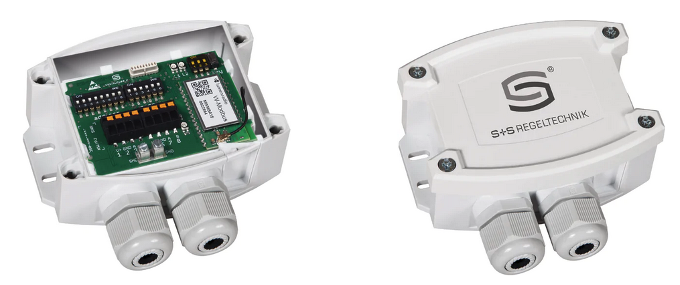
W-Modbus Gateway – Modbus RTU / RS485

The product range includes both sensors for temperature, humidity, and pressure with a wireless Modbus protocol, as well as so-called gateways, which convert a standard Modbus RTU server – such as an electricity meter or photovoltaic inverter – to wireless Modbus. All components use a solution by LumenRadio – OEM modules W-Modbus (for connecting a single Modbus server) and W-Modbus PRO (for connecting up to 16 Modbus servers). These modules are based on MiraOS and MiraMesh standards, which handle wireless transmission at the link layer and include features for device pairing, addressing, and transmission security via 128-bit AES encryption.

If we’re not just dealing with point-to-point communication but a network of multiple wireless devices, it’s important to know that the wireless components use mesh topology – meaning there doesn’t need to be direct line-of-sight between the client and each server. As long as there is a wireless path of no more than 8 “hops” (routes from one device to another) between communicating devices, packets are automatically routed and the entire network acts as one logical unit.

Thanks to frequency hopping, the transmission is highly reliable and resistant to interference, even in industrial environments. The devices have an IP65 rating, so they can be installed outdoors. Signal range is approximately 500 m with direct line-of-sight and 50–70 m inside buildings. However, the material and effective thickness of walls must be considered – for example, if two devices are diagonally below and above each other on different floors, a layer of reinforced concrete several meters thick may block the signal, effectively breaking communication. The more sensors or gateways in the system, the more the mesh technology comes into play, increasing the likelihood that “some” network nodes will always see each other and create a communication path.

For wireless sensors, only the link (Modbus) address is set. The gateway is fully transparent for the Modbus protocol – you only need to set the physical RS485 interface transmission parameters (baud rate, data bits, parity, stop bits) and, if needed, activate the bus termination resistor. On the wireless side, all devices must be logically connected – paired. We’ll use the term “pairing” even when there are more than two devices in the wireless network. Pairing is very simple and requires no additional tools such as converters, computers, or software. Basically, one of the devices is set as the main device (Gateway, Master) and switched to pairing mode. Other devices (Nodes), when also switched to pairing mode, automatically find the gateway and connect to it. This process takes 1–2 minutes. After pairing, the node is locked by flipping a DIP switch, permanently fixing the connection. Device states and pairing progress are indicated by colored LEDs on the devices. After powering up, allow several minutes for network initialization, during which devices search for each other and configure optimal signal paths – Modbus communication will be non-functional during this time.

For advanced settings and diagnostics, the Lumenradio W-Modbus mobile app is available, connecting to the device via Bluetooth. Bluetooth communication is activated by holding the pairing button for three seconds. Once connected, the app allows:

  • Firmware update of the wireless component

  • Error detection (duplicate Modbus addresses, communication errors, etc.)

  • Individual device naming

  • Network settings inspection

  • Network configuration documentation as a .pdf file

Example Topology
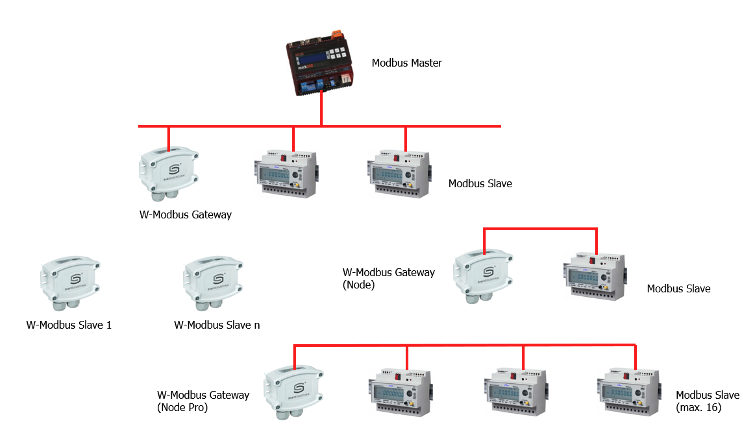
Mixed W-Modbus Topology

  • Modbus Master: PLC, visualization system, etc. with Modbus RTU / RS485 master function

  • W-Modbus Gateway: interface between Modbus / RS485 and W-Modbus on the master side

  • Modbus Slave: electricity meter, thermostat, PV inverter, I/O module, etc. with Modbus RTU / RS485 interface

  • **W-Modbus Gateway (Node): interface between W-Modbus and RS485 on the slave side, for one slave device**

  • **W-Modbus Gateway (Node Pro): interface between W-Modbus and RS485 on the slave side, for up to 16 slaves**

  • **W-Modbus Slave: sensor with a W-Modbus interface, can be integrated directly into the network**

Besides sensors, the product line includes two types of gateways: W-Modbus Gateway and W-Modbus Gateway Pro. Each gateway can be set with a switch to act either as a “gateway” (connected to the RS485 Modbus master) or as a “node,” i.e., an adapter for a Modbus slave device. All devices form one logical Modbus line, and addresses must be unique. W-Modbus Gateway (in Node mode) connects one Modbus slave, while W-Modbus Gateway Pro (in Node mode) can connect up to 16. On the Modbus master side, one W-Modbus Gateway is sufficient, regardless of the number of RS485 slave devices or how many additional Node-mode gateways (or W-Modbus Slave sensors) are in the system.

W-Modbus Slave devices are independent wireless temperature, humidity, or pressure sensors – RS485 connections to them are not possible.

Simplest Topology – Connecting One Remote Modbus RTU Slave:
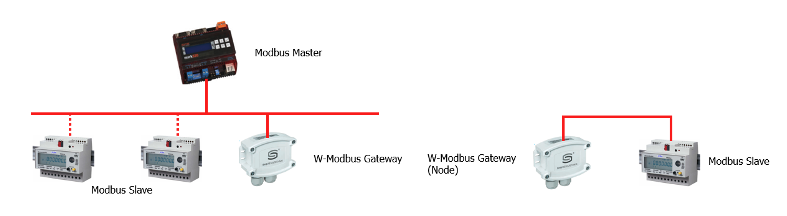
Wireless Connection of one Modbus Slave Device

Only two W-Modbus Gateway devices are needed – one in Node mode.

If there are multiple Modbus slave devices on the remote side, a Gateway Pro must be used:
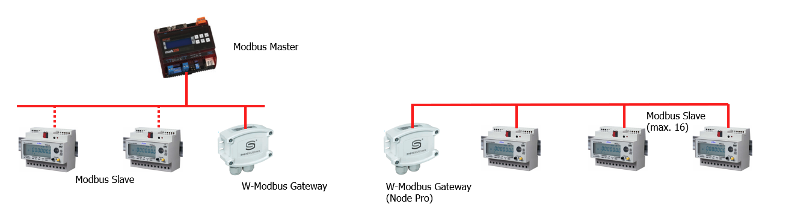
Wireless Connection of a Segment with Up to 16 Modbus Slave Devices

It’s important to consider that inserting a wireless path between RS485 Modbus master and slave introduces a telegram delay of about 60–70 ms. This is clearly shown in the serial communication log – port monitor:

Metallic-only connection – response time 31 ms (based on slave device properties)

11:50:14:142 => 01 03 00 00 00 01 84 0A 11:50:14:173 <= 01 03 02 03 28 B8 AA 11:50:14:690 => 01 03 00 0A 00 01 A4 08 11:50:14:722 <= 01 03 02 0F 28 BD AA

Connection with wireless link (1 hop) – response time 95 ms

11:45:46:340 => 01 03 00 14 00 01 C4 0E 11:45:46:435 <= 01 03 02 09 B9 7F A6 11:45:46:951 => 01 03 00 00 00 01 84 0A 11:45:47:046 <= 01 03 02 03 28 B8 AA

If communication tends to fail or becomes completely non-functional, it will be necessary to set a longer timeout period in the Modbus master's configuration.

Prev
Text Parser (.NET) protocol driver